

ASAP, Magandang Buhay, Ang Probinsyano, Pamilya Ko, TV Patrol… Watch your favorite online Pinoy shows, movies, news and live channels on your TV with the iWantTFC (TFC.tv) add-on for Kodi!
What is TFC?
The Filipino Channel, commonly known as TFC, is a global subscription television network owned by the Filipino media conglomerate, ABS-CBN and is available globally on direct-to-home satellite, cable, IPTV (Internet Protocol TV) online streaming, video on demand and on other over-the-top content platforms.
TFC.tv video streaming website now known as iWantTFC propose free, premium streaming content through a FREE or PREMIUM subscription plan.
iWantTFC (TFC.tv) add-on features
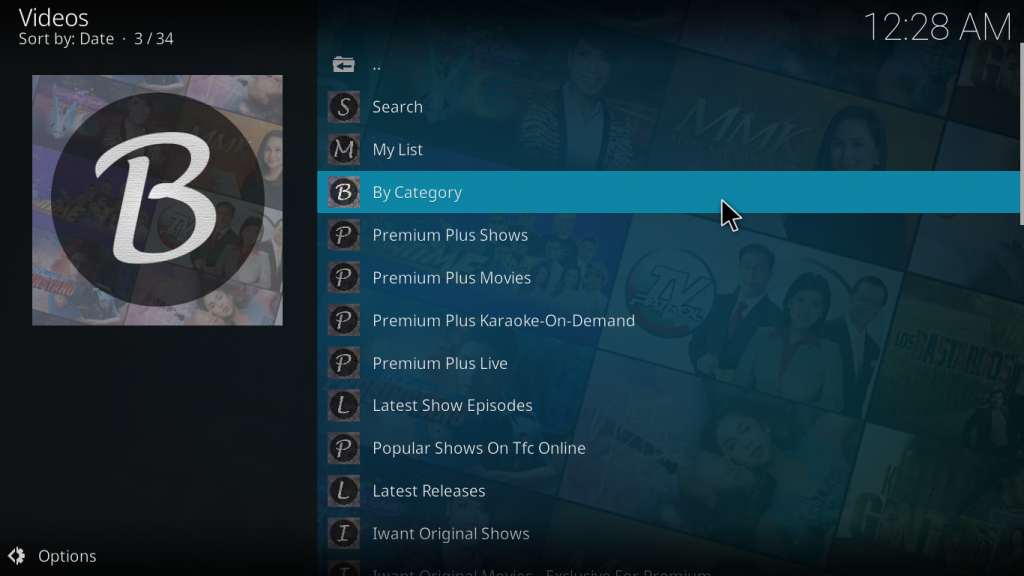
This add-on uses your iWantTFC account to access and display the iWantTFC website catalog:
Keep navigation simple 
Find your favorite shows 
Watch the latest episodes 
Shows with English subtitles
- Easily access the different categories and shows
- Manage your favorite shows and episodes through your watchlist.
- Have an overview of your iWantTFC account
Since version 1.x of TFC.tv add-on:
- Have a better user experience with new icons and fanarts
- Keep your favorite shows in your iWantTFC watchlist for easy access
- Search your shows, movies, episodes by category, title, cast, date, year
- Export your favorite show’s episodes to your Kodi library
Since version 3.x of the add-on:
- Continue Watching: pick up where you stopped, with a progress bar and Kodi’s Resume from / Play from beginning
- My View History: what you played, last viewed first; played episodes are flagged as watched
- Seasons: choose the season of the shows that have several
- New episodes: the add-on looks for new shows and for new episodes of the shows of your list, and notifies you
- Skip Intro / Skip Recap: when iWant marks the intro or the recap of an episode, a button appears on the video (or the add-on skips it by itself, as you choose)
- Up Next: Kodi offers the next episode at the end of an episode, when the credits start if iWant marks them (optional Up Next add-on)
- Video quality: choose how the stream is selected and a maximum resolution
- Trakt: optionally scrobble what you watch to your Trakt account (see below)
- Live TV: a main menu entry with the live channels of iWantTFC (TV Patrol, ANC Global…) then the live events, for your country
- My List and your iWant watchlist: synchronize the two (Tools > Synchronize My List with iWant), then what you add or remove in Kodi follows on iWant
- Search the website (online): finds anything the website has, live channels included, and adds to your catalog the shows and movies it did not have
- Top Picks Near You!: the picks of iWantTFC for your country
- A ready-made catalog is installed on a first installation, so the add-on is usable at once
Trakt
The add-on can scrobble what you watch to your Trakt account. It is off by default: turn on Scrobble what I watch to Trakt in the add-on settings, then choose Connect to Trakt and enter the code shown on trakt.tv/activate. The add-on never sees your Trakt password, and you can disconnect at any time. When Trakt can’t tell which show it is, choose it with the context menu Choose the show on Trakt.
iWantTFC Kodi uses Trakt but is not endorsed or certified by Trakt. See the privacy notice for what is sent and kept, and the Trakt guide.
Documentation
The add-on wiki describes the menus, the catalog, every setting and playback troubleshooting.
Open-source code
TFC.tv add-on for Kodi was originaly developed and shared by Todits until v0.41 and has been recovered and redeveloped by Cmik.
This is an open-source project and can be found in Github.
How to install?
Follow our installation guide.
See also our Q&A section for more info.
Requirements
These are the minimum requirements to use the TFC.tv add-on for Kodi:
- An iWantTFC account (login and password) is required to enjoy iWantTFC catalog through the add-on.
- Kodi platform compatibility: Kodi 19+ to install the add-on. Playback is tested with Kodi 21 (Omega) and the current Widevine CDM: the videos are protected by Widevine and played with inputstream.adaptive (Kodi offers to install what is missing). Kodi 20.1 crashes with the current CDM, and an older CDM is refused by the license server.
- An internet connection
- Optional: the Up Next add-on (
service.upnext), to be offered the next episode at the end of an episode. Install it from the Kodi add-on repository; the add-on detects it by itself, and the setting Offer the next episode at the end (advanced settings, on by default) turns the feature off.
Disclaimer
- iWantTFC (TFC.tv) add-on for Kodi is not part of official apps proposed by iWantTFC (iOS/Android/Roku) and Cmik is not related or affiliated by any kind to iWantTFC.
- iWantTFC does not provide support for this add-on. See Support section below for more information.
- iWantTFC (TFC.tv) add-on does not provide “Pirated content” as it only allows to access iWantTFC content with your iWantTFC personal account. It does not allow you to access content not included in your plan.
- iWantTFC (TFC.tv) add-on communicates strictly with iWantTFC website to authenticate (using your iWantTFC credentials), retrieve contents (menus, descriptions, images, videos). It also downloads a ready-made catalog of shows and episodes from the add-on’s GitHub release (on installation only) to improve the user experience. If you turn on Trakt, what you watch is also sent to Trakt (see the Trakt section).
- Cmik provides the add-on for free and for non-commercial purposes, downloadable directly from Cmik’s repo. The add-on is provided without warranties of any kind, whether express or implied, including, but not limited to, implied warranties of merchantability, fitness for a particular purpose, non-infringement or course of performance.
Support
As this add-on is not affiliated to iWantTFC but only use iWantTFC website services, you can only find support by asking Cmik or the Kodi community through the following channels:
- Share your experience / Seek help from other users on Kodi Forum.
- Report an issue on Github.
Therefore, you can solicitate iWantTFC support only if you have issues with your iWantTFC subscription or the iWantTFC website.

Amazon Fire TV Stick 4K
Advanced 4K streaming - Elevate your entertainment with the next generation of our best-selling 4K stick, with improved streaming performance.
